
DroidDeck promises Steam on your Android device without a PC: handheld revolution or mirage?
By Redacción UWLG · Source: Dexerto
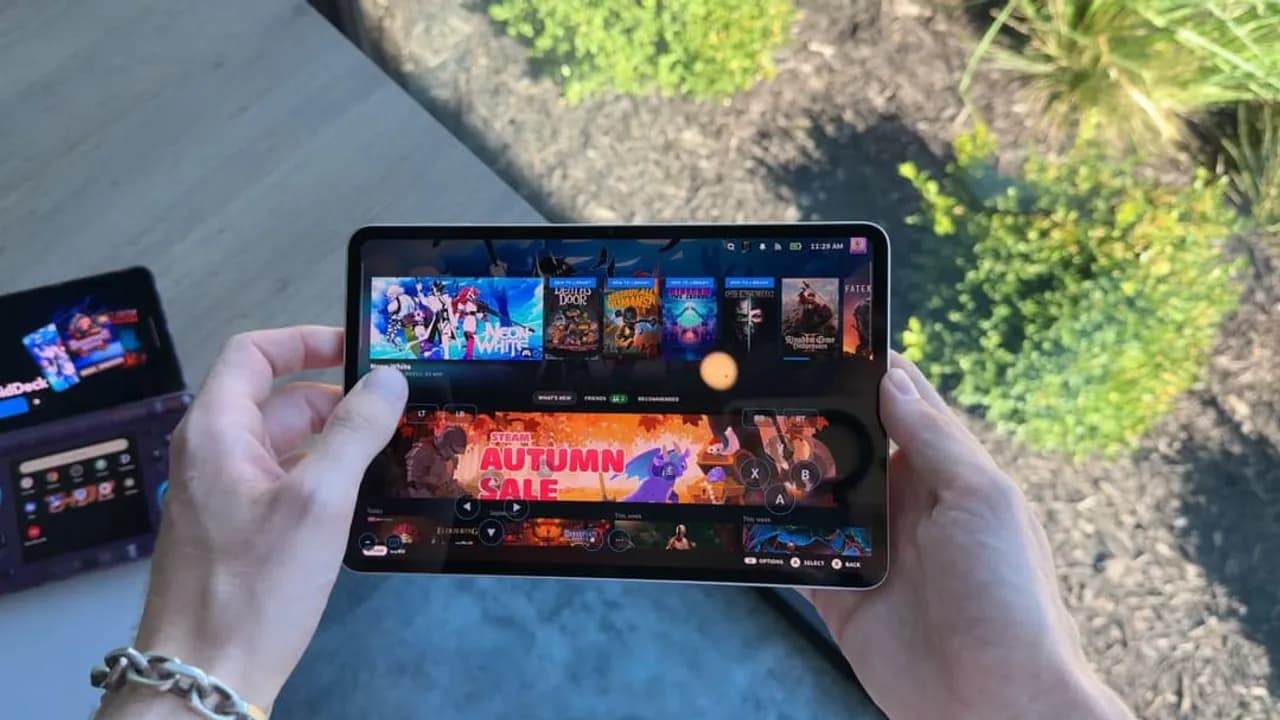
Imagen: Dexerto
The dream of carrying your Steam library in your pocket just took another step forward. According to Dexerto, a free app called DroidDeck lets Android phones and handheld consoles run Steam and play PC games directly on the device itself. The key difference is that there's no streaming from a machine at home and no cloud service involved: the game lives and runs on the hardware in your hands.
This matters because, until now, the usual way to play your Steam catalog on Android meant relying on a PC switched on in another room, through tools like Steam Link or Remote Play, or paying for a cloud gaming subscription. If a free app removes that requirement, the phone stops being a simple remote screen and becomes a PC gaming platform in its own right, something that could change how many players and creators think about handheld gaming.
What you need to know
- DroidDeck is a free app for Android devices.
- It lets you run the Steam client and play PC titles directly on the device.
- It works on both phones and Android handheld consoles.
- You don't need a gaming PC: this isn't streaming from another machine.
- The core information comes from a report by Dexerto.
Context: from streaming to running locally
For years, playing Steam on Android has, in practice, meant streaming video. Your PC does the heavy lifting, and the phone just displays the result and sends your inputs back. It works, but it comes with obvious trade-offs: you need a powerful machine switched on, a stable network, and a tolerance for latency. For anyone without a PC, that door was simply closed.
DroidDeck is aimed squarely at that audience. Generally speaking, running games built for Windows on an Android device is no small feat: PC games are designed for a different architecture and a different operating system, so any solution of this kind usually relies on compatibility and translation layers that come with a performance cost. The source doesn't specify which games work, how well they run, or on which specific devices, so it's worth greeting the announcement with excitement, but also with caution.
Who does this affect?
- Android handheld owners: the most obvious audience, since they already have physical controls and a form factor built for gaming.
- Players without a gaming PC: especially in regions where desktop hardware is expensive and the phone is the main device.
- Content creators: pushing these apps to their limits, comparing devices, and showing what runs and what doesn't is almost guaranteed video material.
Our take
Here in the Underworld Lordz newsroom, we see this with a mix of excitement and healthy skepticism. Excitement because our community, spread across the Americas and Europe, knows full well that not everyone has access to a powerful PC, and any tool that opens up access to a game library you've already paid for deserves applause. If you paid for your games, being able to play them on the device you actually own is just common sense.
That said, let's be clear for competitive players: this won't replace your setup. Running PC games on a phone almost by definition means sacrificing performance, stability, or both, and in competitive play every frame and every millisecond counts. On top of that, many competitive titles use anti-cheat systems that tend not to play well with unconventional environments, so don't expect to jump into ranked from the bus. Where we see real value is in indie games, single-player titles, and less demanding classics: perfect for practicing, killing time, or discovering something new while away from home.
For creators, the opportunity is huge, but it comes with responsibility. News like this lends itself to overhyped headlines along the lines of "your phone is now a gaming PC." We recommend the opposite: honest testing, showing the flaws, naming the exact device, and not promising what the app can't deliver. One final note: when you install third-party software that asks for your Steam credentials, check its source and reputation carefully before logging in. Free shouldn't mean putting your account at risk.
What do you think?
Do you see DroidDeck as the start of a new way to game on the go, or as a curious experiment that won't go any further? Would you give it a shot on your phone or handheld, or are you sticking with your PC and good old streaming? Let us know in the team chat or on our Discord: which game from your Steam library would be the first one you'd try to run on your Android device?
Your turn
What do you think?
Share your take in the team chat or on Discord. We feature the best opinions in the next article.
How did it land?
Community takes
…
Keep reading

Gaming
Beyond the Dark: Nightwatch: Co-op Horror on Switch 2 Featuring the Voice of Joel

Gaming
Deadpool in MW3? The Leaks Are Exciting, but Fortnite's Wolverine Is Still in the Vault
Gaming
Uncontrolled Level Packs: The FPS Wild West That Ended Up in Court

Gaming
Xbox Cuts Studios and Launches Xbox XP: Its Bet on Film, TV and Merchandise